
How to open an automatic gate by hand in a power outage
Lost power and the gate is shut? Every automatic gate opener has a manual release. Here is the exact procedure for the LiftMaster openers we install most, and how to lock the gate back to automatic.
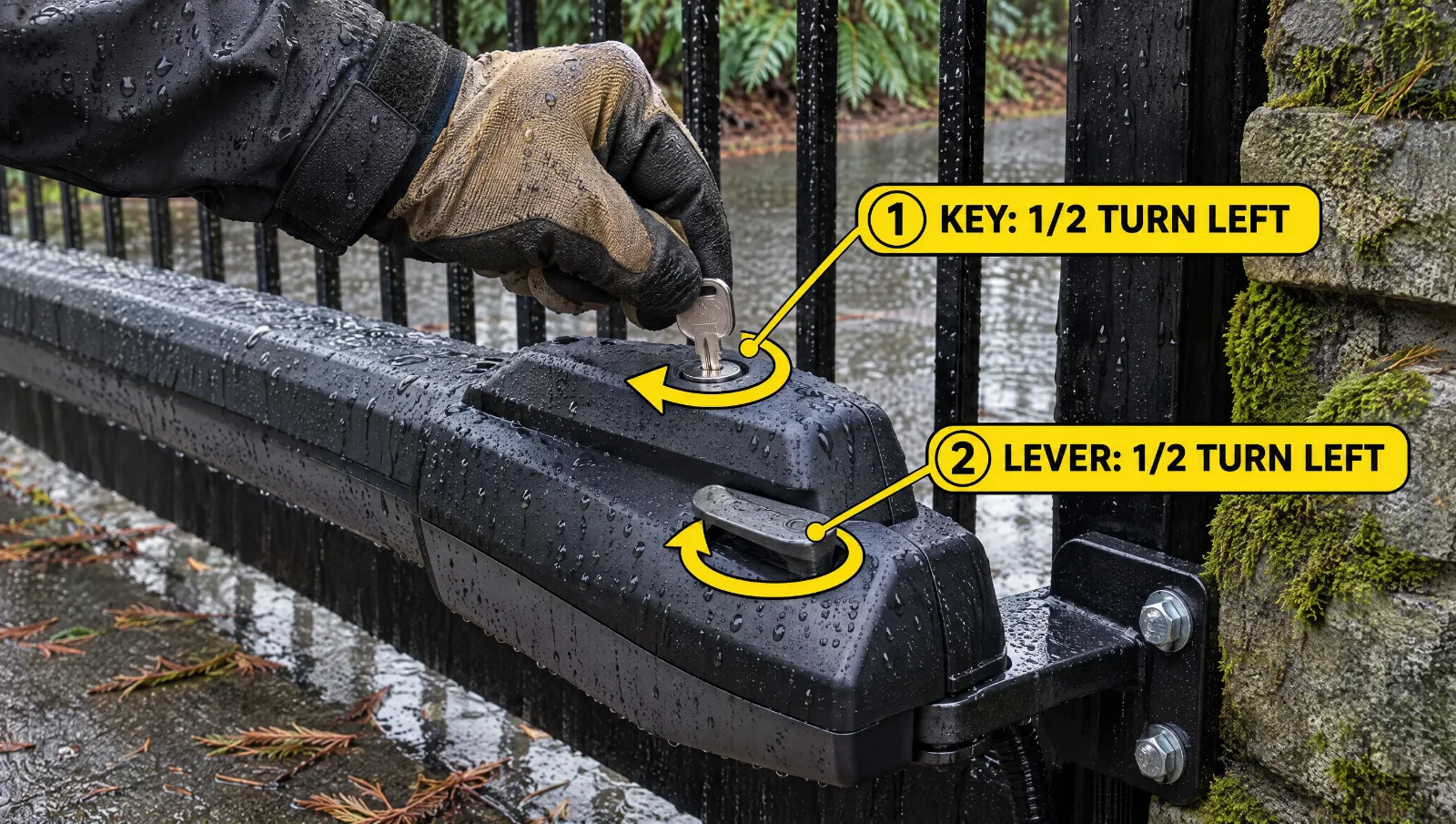
Make sure the gate is not moving. On a LiftMaster LA400 swing arm, insert the release key, turn it 180° counter-clockwise, then turn the release lever 180° counter-clockwise; the gate now moves by hand. To go back to automatic, turn the lever 180° clockwise, then the key 180° clockwise, and remove the key. On a double gate, release both arms.
Swing gate: LiftMaster LA400 arm opener
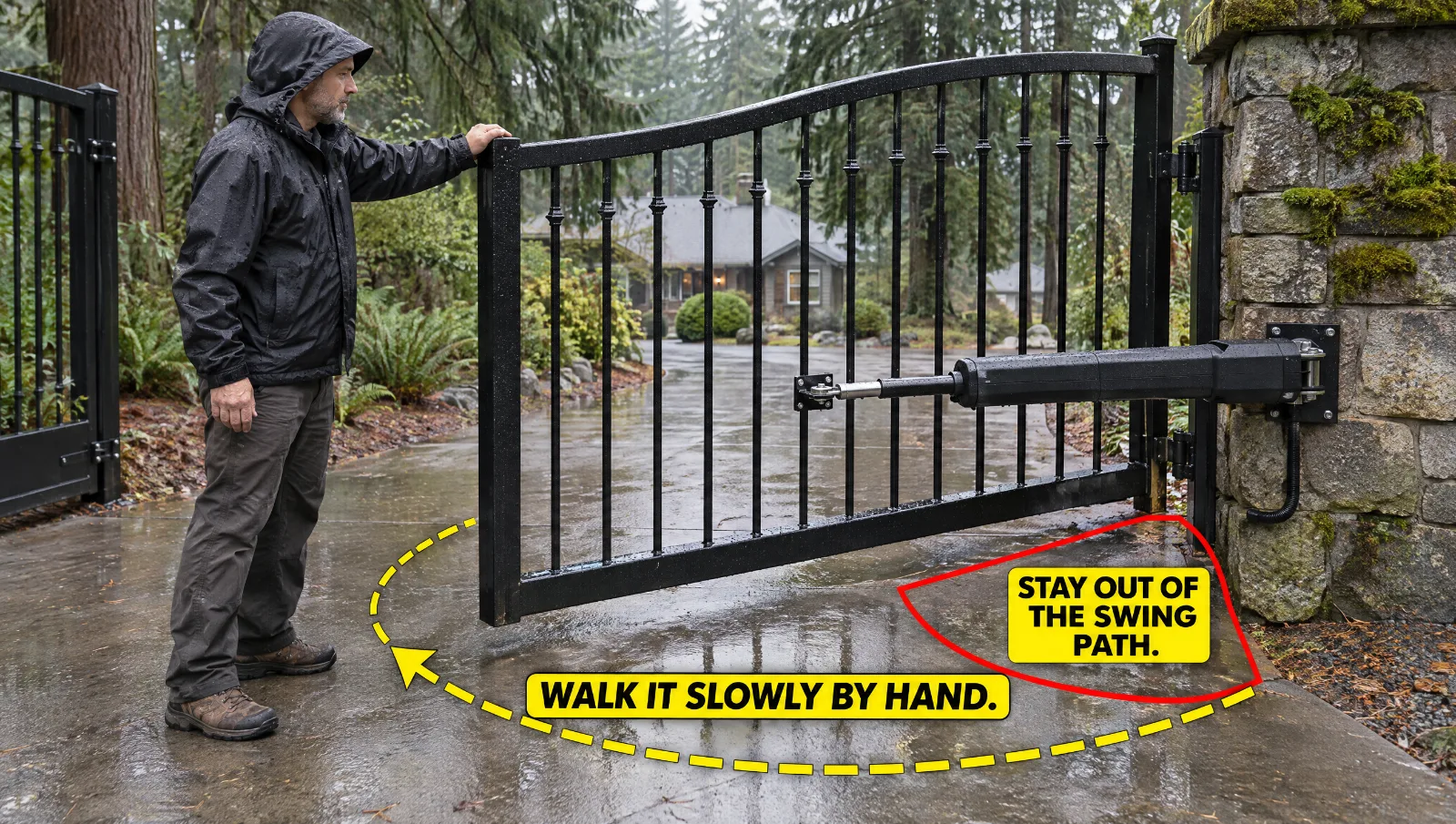
- Check that the gate is stoppedUse the manual release only when the gate is not moving. Keep kids, pets and cars out of the gate’s swing path.
- Insert the release key and turn itPut the LiftMaster release key in the lock on the arm and turn it 180° (a half turn) counter-clockwise.
- Turn the release leverTurn the release lever 180° counter-clockwise. The motor is now disengaged. The release can feel stiff or jerky, which is normal.
- Move the gate by hand, slowlyWalk the gate open or closed. On a double gate, release both arms first. If the gate will not swing freely, stop: the problem is the gate (a hinge or post), not the opener.
- Lock it back to automaticWhen power is back, turn the release lever 180° clockwise to engage the motor, then turn the key 180° clockwise to lock the lever. Remove the key and keep it where you can reach it from outside the gate.
After a manual release or a full power loss, the opener may run slowly until it finishes one complete open and close cycle. The LiftMaster manual lists this as normal.
Sliding gate: LiftMaster RSL12UL slide opener
- Check that the gate is stoppedAs with a swing gate, release only a gate that is not moving.
- Press the reset switchPress the reset switch on the front of the operator cover. It stops the gate and disables the opener in place.
- Release the handleRelease the manual disconnect handle. The gate can now be rolled open or closed by hand. On a two-leaf (bi-parting) slide gate, release the handle on both operators.
- Re-engageTo go back to normal operation, push the handle back down to tighten it.
Other brands and older openers
Most openers use a key, lever, handle or crank. Look for a keyhole or release on the operator body and a label inside the cover. If you can’t find it, call us with the brand and model printed on the opener and we will walk you through it.
Stop and call a technician if
- The gate won’t move freely after the release, or it scrapes, sags or leans
- The gate is on a slope and starts to roll or swing by itself
- You can’t find the release key, or the release is seized
- You see damage or exposed wires, or smell burning. Keep away from the control box.
- The gate is stuck closed and someone urgently needs to get in or out
Get ready before the next outage
Keep the release key on your key ring or in a lockbox you can reach from outside. LiftMaster DC openers run on batteries, so a healthy backup battery can keep the gate working through a short outage. See the maintenance checklist for when to replace it.
Questions gate owners ask
Can I open an electric gate without power?
Yes. Every automatic gate opener has a manual release (a key, lever, handle or crank) that disconnects the motor so the gate moves by hand. Use it only when the gate is stopped.
Where is the manual release on a LiftMaster swing gate opener?
On the LiftMaster LA400 it is a key-and-lever release on the arm: key a half turn counter-clockwise, then the lever a half turn counter-clockwise. Replacement release keys are LiftMaster repair parts; call us with your model if you lost yours.
Why is my gate slow after a power outage?
The LiftMaster manual notes that after a manual release or a complete power loss, the opener may run slowly until it completes one full open and close cycle. Run it through a full cycle and it should return to normal speed.
Will my gate open by itself when the power goes out?
It depends on how the opener is set up. LiftMaster DC openers run on battery and can be programmed to open or to stay in place when AC power fails. Ask your installer how yours is set.
Is it okay to leave the gate in manual mode?
Only until power is back. In manual mode the gate won’t open or close on its own, so re-engage the release as soon as you can.
Related gate guides
Still stuck? Talk to a gate tech.
Interactive Gates & Security repairs swing and slide gates of any brand in Washington, Oregon and Southern California. $89 tech visit fee, then an itemized quote before any repair.
WA (425) 900-6083 · OR & SW WA (971) 351-9750 · CA (657) 312-3376